
A lesson looks wrong
Updated 7 October 2026
If the script, answer or hint seems incorrect, open "Report a lesson problem" under the lesson, pick what needs attention and tell us; we check every report.
If an answer seems wrong, check the spelling and scoring rules below. To report a problem, sign in and open Report a lesson problem under the lesson. Choose what needs attention, describe what happened and choose Send problem report. The form includes the lesson and its version automatically, and a person reads every report.
Check these scoring rules
- Contractions. Write the form you hear: if the speaker says "I'm", type "I'm". A full form such as "I am" also counts when that clip accepts it as an alternative. Acceptance can differ between clips.
- British and American spelling. One script serves every accent. A spelling such as "colour" or "color" counts when it matches the script or an accepted alternative for that clip. If a spelling you expected to pass was marked wrong, tell us which word so we can check it.
- Capital letters and punctuation. They don't affect your score, so a missing comma or a small letter at the start isn't a mistake on your side or ours. Spelling does count: check the marked word in the Word-by-word feedback before you decide the answer is wrong.
Hints are meant to help you recover the words in the recording. A hint that only names the topic, or shows a word that isn't in the clip, is exactly what we want to hear about.
Report it from the lesson
- Sign in. The report tool only appears for signed-in accounts.
- Open the lesson and scroll past the related lessons to Report a lesson problem ("Tell us about an audio, answer or lesson issue."). Choose it to open the form.
- Under What needs attention? pick Audio, Answer, Hint, Access (a clip marked "Part of membership" that you think should be open) or Something else.
- In Describe the problem, say which clip (for example "Listening 2 of 4"), the accent you chose, what you heard and what the script, answer or hint showed instead. Use 10–1,500 characters, and don't include passwords or payment details.
- Choose Send problem report.
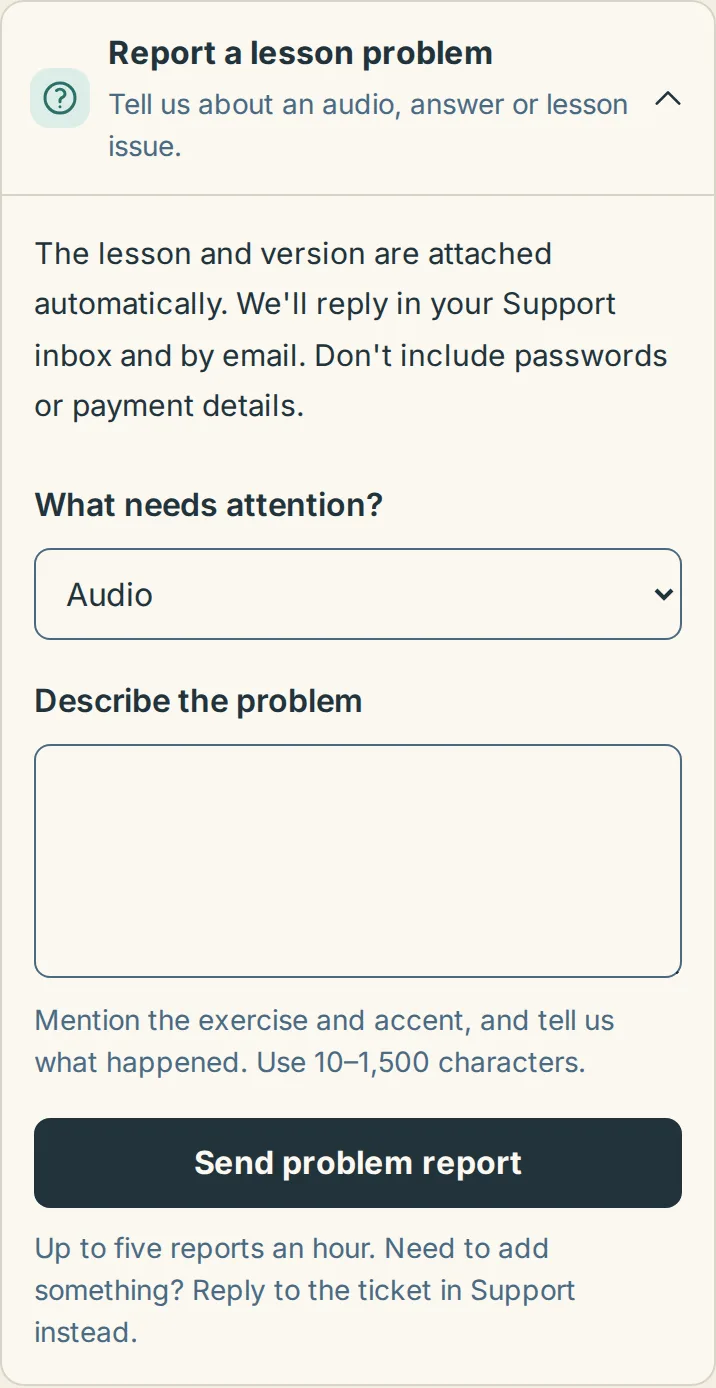
You can send up to five reports an hour. To add something to a report you've already sent, reply to it in Support instead of sending a new one.
What happens next
The page confirms your report and links to it in your Support inbox. We aim to reply there and by email within one working day. Checking and fixing a problem can take longer. When a script, answer or hint is wrong, we correct the lesson itself, so the change reaches everyone who practises it. You will see the correction when you next open the updated lesson.
If you're not inside the lesson
Use the contact page with "A lesson or its audio seems wrong" selected and include the lesson name: Contact us about a lesson. For sound problems rather than wrong words, see Audio won't play or cuts out first. How the check treats each word is explained in How scoring works.
